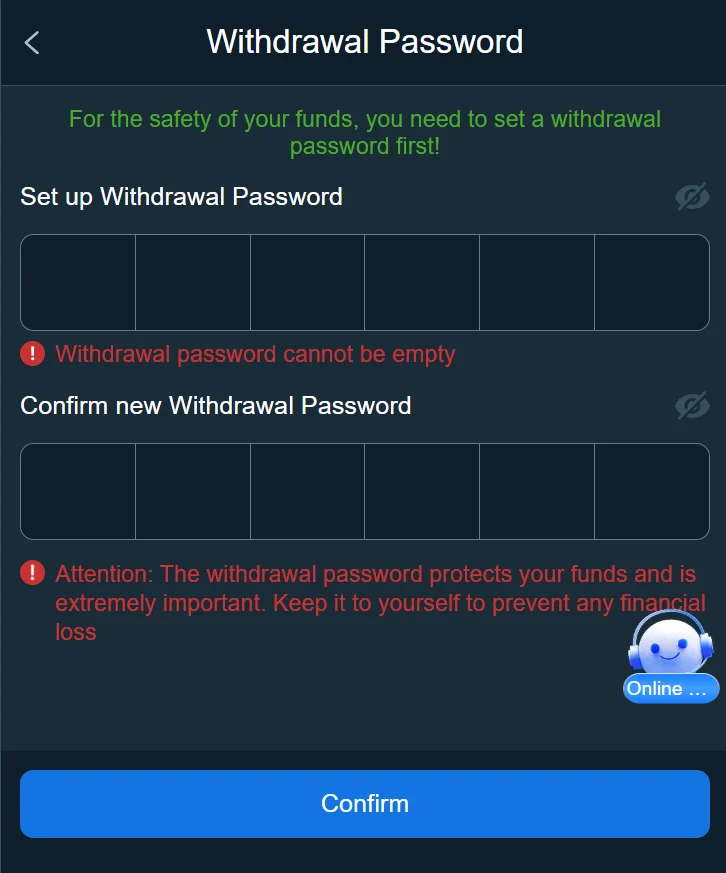
What the withdrawal preview actually shows
The screen headed Withdrawal Password is a setup step. It asks for a password twice and displays six separate boxes on each row. The first row is labelled Set up Withdrawal Password, and the second asks you to confirm the new password. An eye symbol sits beside each label. At the bottom is a blue Confirm button. There is no amount field or destination on this screen. Pressing a password confirmation and receiving a payment are distinct events.
This distinction helps when searching for Pak Get withdrawal information. If the view on your phone resembles this image, start by identifying which step you are on. Someone looking for a payout reference will find no such number in the pictured fields. Likewise, the lobby balance and promotion panels answer different questions. Read the title and field labels before following advice that mentions a button with the same name on a later screen.
Choosing and confirming a withdrawal password
Treat this password as a separate piece of account information. Select a value that meets the instructions inside your own account and that you can keep privately. Six boxes appear in the screenshot, but a still image does not establish the current rules about acceptable characters or recovery. Avoid a birthday, a familiar public number, or the code you already use for a mobile wallet. If you use a password manager, label the entry clearly so you can distinguish it from the ordinary sign-in password.
An empty-field message appears beneath the first row in the image. Read its wording before taking another action. If the interface reports that two entries differ, clear both rows and enter your intended value carefully in a private place. Repeatedly tapping Confirm provides little information if the same field remains empty. On a shared or mirrored screen, take a moment to end screen sharing and move away from onlookers before revealing any character with the eye icon.
Telling sign-in trouble from a payout problem
A PakGet Game login password opens an account session, while the withdrawal password label describes a separate control. You can therefore reach a withdrawal setup screen even though you have already signed in. When describing a problem, give the title of the screen and its visible error message. Saying that you can open the lobby but cannot confirm a withdrawal password points support toward a different issue than saying you cannot reach your profile at all.
If you have forgotten a value that was previously set, look for recovery information inside the account you already use. The supplied screenshot only covers initial setup, so it cannot establish that a reset button exists, what evidence may be required or how long recovery takes. A private message offering a universal reset code cannot resolve that uncertainty. Pause if somebody asks to watch you type a wallet PIN or requests a fresh one-time code in return for access.
Finding out what can be withdrawn
Before you decide whether to request a payout, locate the figure that the live account explicitly identifies as available for withdrawal. The supplied Pak Get images use similar looking rupee amounts for different purposes. On the invitation page, for example, Claimed, Unclaimed and Total Commission appear as different lines. A headline about an invitation bonus tells you very little about whether any of those funds have entered a withdrawable balance. Read the labels alongside each number.
Write down the questions the screenshots leave open. Which withdrawal methods appear for your account? Which amounts can be requested, which fees apply, and how much would reach the destination? Does the account show any condition beside promotional credit? The deposit image names JazzCash and displays a range for deposits, but the withdrawal password screen lists no payment providers or payout range. Check each item on its own screen before relying on it in a decision about money.
Reading the final review screen
If a later screen offers a withdrawal review, take your time there. Compare its destination label with the wallet or account you intend to receive the funds. Check the amount, currency and any separately disclosed deduction, then write down the net figure shown. If a destination is abbreviated, use the visible identifying digits and account name to check it. An unclear name, changed number or unexpected charge is a reason to stop and investigate before confirming.
For a simple example, imagine you intend to withdraw Rs800. A review displaying Rs800 requested and Rs780 to receive raises a specific question about the Rs20 difference. Those amounts illustrate how to read two figures and are not Pak Get rates. Look for an explanation on the actual transaction screen. If the difference is unexplained, take a private note and leave the request unconfirmed. A support contact can discuss a missing explanation without knowing your password.
Following a request that is still pending
Once you submit a request, record its identifier if one is displayed and the time at which the status appeared. Save the precise status wording. There is a meaningful difference between a request you were unable to submit and an accepted request that still awaits its next update. A spinning wheel or closed browser tab cannot tell you conclusively which happened. Reopen the same account and inspect its history before considering a second request for the same amount.
If the app reports completion, check the receiving account independently. Match the actual incoming entry using the amount, reference where available and date. Two transfers can have the same rupee value, so an amount alone may be an ambiguous match. If your receiving account shows no matching credit, report that specific discrepancy. An advertised processing time from another site or a screenshot of another person’s receipt cannot establish when your own request will finish.
Asking for help without disclosing access
Prepare a short account of the issue before opening support. Include the relevant screen title, date, approximate time and whether money appears to have left or arrived. Add the request reference in the appropriate private channel if one exists. A message such as “My request is marked complete, but I cannot find the matching credit in the destination wallet” makes the problem clear. Share the minimum information needed to locate the case and ask for a case reference in return.
If somebody offers to release a pending balance after a new deposit to a private number, leave the conversation without sending money. Keep the message and transaction details if you need to report the contact. Verify any explanation through a channel you located independently, especially if a stranger approached you after you posted about a delay. Your withdrawal password, wallet approval code and phone access all remain private during a payment dispute. Avoid posting images of them in a public group.
Closing the record and deciding when to pause
Once a payment appears in your receiving account, enter the actual credited amount in your personal record. Keep the original request beside it so you can distinguish what you asked for from what arrived. Where a difference remains unexplained, keep the record open and use the same reference for follow-up. Keeping dated notes takes much less effort than reconstructing several similar requests from memory at the end of a week.
A pending withdrawal can make it tempting to keep playing while you wait. If you opened the account only to check a payment, leave after recording its status. Set a time to follow up and close the lobby. Avoid committing more money on the assumption that an expected credit will cover it. If difficulties with withdrawals are affecting your spending decisions, the Responsible Gaming page offers practical ways to step back, review your limits and involve someone you trust.