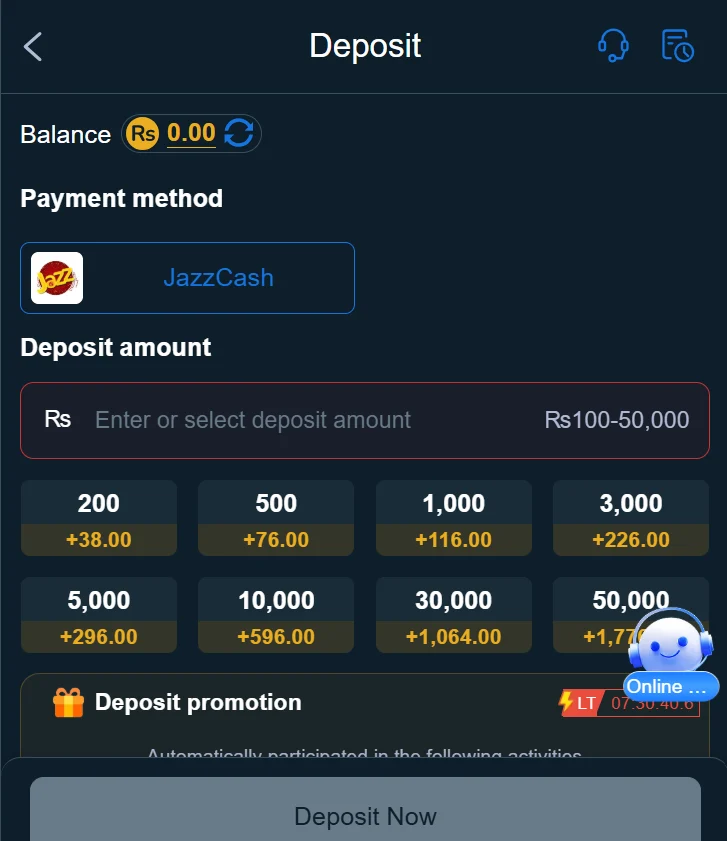
Reading the Pak Get deposit screen
Open the deposit preview and start at the top left. Under the heading, a yellow balance indicator reads Rs 0.00. An icon beside it suggests refreshing the displayed figure. Below that row, JazzCash appears under Payment method, followed by an amount field, a grid of suggested amounts and a promotion panel. The bottom bar says Deposit Now. These details describe the screen captured for this page. They cannot tell you who controls a receiving account or whether a transfer will be credited.
There are three separate numbers worth following on a real payment. One is the amount you intend to spend, another is the amount your wallet asks you to authorize, and the last is the amount recorded in the game afterward. Write the first one down before deciding whether to proceed. If a later screen changes it, stop at that screen and check the reason. A download or a look around the lobby need not involve a deposit.
What the rupee amounts mean
The PakGet preview shows Rs100–50,000 beside the entry field. Its first row of buttons reads 200, 500, 1,000 and 3,000. The next row includes 5,000, 10,000, 30,000 and 50,000. These are values shown in a particular capture. Before using a live version, check the current minimum, maximum and currency for the payment method you have selected. A preset represents an available choice in the pictured interface. Its presence tells you nothing about what would be affordable for you.
The smaller yellow figures can be easy to misread on a phone. For example, the 200 tile shows +38.00 underneath, while the 500 tile shows +76.00. The screen does not explain what those additions buy or whether they could ever be withdrawn. If you tap a tile accidentally, look back at the amount field and the wallet confirmation before doing anything else. On a crowded screen, your own intended amount is a more reliable reference than the last highlighted colour.
Before choosing a payment method
The screenshot identifies JazzCash on the deposit side. It supplies no confirmation of a commercial relationship, no named recipient and no example of a completed wallet payment. Find out exactly whom the live payment request would pay. A name, wallet number or QR code supplied in a private message is a separate destination that needs independent verification. If you cannot identify the recipient from the terms and payment request, close the request and keep the funds in your wallet.
A shared phone makes the account check particularly important. You might be viewing your own Pak Get Game profile while a family member is signed in to the payment app. Before even choosing an amount, check the account label on each side. Use only a payment account you control and are entitled to use. Keep your wallet PIN, a one-time approval code and any sign-in recovery details private throughout the process. Nobody reading an error report needs those secrets to understand the problem.
Separating promotions from a payment
Near the bottom of the screenshot, Deposit promotion appears beside a gift symbol and a timer. Elsewhere in the supplied images, the lobby and register panel advertise download and invitation offers. These messages refer to different activities. A bonus on one screen cannot establish the conditions for another. Look for the offer text attached to the precise payment choice you are considering, including eligibility, expiry, withdrawal restrictions and what happens if you decline it. Leave the offer alone if those details are unavailable.
Suppose the amount you initially considered was Rs200 and a larger tile caught your eye because its yellow figure looked more generous. Compare the additional money leaving your wallet with what you actually know about the offer. A promise in promotional copy does not pay your electricity bill or return the transfer if you change your mind. If you would decline the larger amount without the coloured label, keep that decision when the label appears. Closing the screen costs you nothing.
Checking a request before authorizing it
Pause when the payment provider presents its own confirmation. Read the amount, currency, recipient and any fee from top to bottom. If the screen includes a reference, keep it with your own note. Compare these details with the request you opened in Pak Get. An approval notification arriving a few seconds later may belong to another action, especially if you opened several apps or tried a second payment method. If more than one request is visible, avoid guessing which one is yours.
Consider a simple mismatch. You chose Rs500 and the wallet request shows Rs5,000. Even if the profile name and payment time look familiar, the amounts differ by a factor of ten. Dismiss the request and check which tile was selected. Never approve a larger figure on the understanding that somebody will manually adjust the difference afterward. The amount on the final authorization is the figure that matters when you decide whether to allow a payment from your wallet.
When the balance does not update
If your wallet shows a debit while the game still shows the previous balance, one transaction needs investigating. Take a moment to note the amount, time, wallet reference and status shown by each service. Check whether the game has a receipt or history entry. Refreshing the balance once can help you read the latest display. Starting a fresh payment creates another transaction with its own reference, which makes the original question harder to answer and puts more money at risk.
Describe the discrepancy precisely when contacting support through a channel you obtained independently. For example, say that the payment provider shows a completed debit, give its time and reference, then describe the game balance or order status you see. Ask which entry corresponds to the reference. Crop unrelated transactions and personal details before sharing an image. If the debit is unfamiliar, go to the payment provider directly through its own app or contact page and identify the transaction there.
Keeping a clear account of spending
A useful deposit record can fit on one line. Write the date, the amount leaving your wallet, the receiving account label, the reference and whether the game recorded it. Keep promotional credit in a separate column if you track it. At the end of a session you can compare actual transfers against your spending limit without having to reconstruct the sequence from banners or balance changes. Save these notes privately, especially if screenshots include wallet numbers or account identifiers.
Look beyond the last transaction when checking how much you spent. Three payments of Rs200 on the same evening amount to Rs600 even if each confirmation felt small. Adding up payments before opening a new one gives a clearer picture of the session. If reaching your limit leaves a promotion unfinished or a balance near zero, end the session anyway. The Responsible Gaming page includes ways to plan that stopping point before you return to the lobby.
A final check on the deposit button
In the provided image, Deposit Now appears muted and no amount is entered. A screenshot cannot reveal exactly which conditions enable the button in the current app. If the button seems unavailable, first establish whether you meant to make a payment at all. There is no need to type a trial amount, supply identity details in chat or send a transfer outside the app just to find out why a control looks inactive.
Return to the withdrawal information before committing any funds if access to the balance matters to your decision. The withdrawal image documents a password setup screen, with no confirmed payout limits, fees or processing timetable. Know what is missing from the available information as carefully as you read what is present. You can explore the screenshots, compare the account pages and leave a deposit unfinished while those questions remain open.